Category: CPD

  • Hacks for Hybrid Working… flex course reflection

    In the past couple of months I had the wonderful opportunity to work on a project outside my day job. Together with the awesome folk at Reclaim EdTech, and working closely with Lauren Hanks, we embarked on a journey to design and run a four week flex course all about hybrid working.

    It was interesting to learn more about the format of flex courses, which are run regularly each month in the Reclaim EdTech community (check out the events calendar). I have experience of different formats of courses, but I hadn’t come across one yet that uses this format, combination of Discord, blog posts, videos and interactive sessions.

    With a blend of synchronous and asynchronous element, I love that these course fit around busy schedules, and are available to offer expertise and support when needed.

    What the course was about

    This particular course focused on a different topic each week, and here is a quick overview quoting Lauren Hanks’ post:

    EVENT SUMMARY

    For many of us in Higher Ed, hybrid working is here to stay. So whether you’d like to create a better work/life balance juggling being on campus with working from home, or you are looking to move from crisis mode to a way of working that is more sustainable, healthful or simply a little more joyful, this course is for you. Join us to explore hacks to create a better hybrid workplace for everyone.

    We are excited to join forces with Dr Maren Deepwell, author of Leading Virtual Teams and each week features ideas to try out, prompts to reflect on and resources with a host of community voices. Here’s our topic list:

    • Week 1: Hybrid Working Unpacked
    • Week 2: Digital Tools in the Virtual Workplace
    • Week 3: Exploring Hybrid Working Hacks
    • Week 4: Complete your Hybrid Working Roadmap

    The final post we published at the end of the course gives you a bit of a flavour of what it was all about in practice.

    What I learnt along the way

    What I enjoyed most about the course are two things: firstly, it was super stimulating to work with Lauren, who, like me, lives and breathes the reality of leading a hybrid workforce day in, day out. We had a lot of fun running sessions, designing activities and reflecting on the questions from our participants.

    It was a huge learning curve for me to work with a different team, in a new environment, and having such experienced collaborators made it all feel easy and interesting. You can always tell when you are working with folk who know how to work together virtually, and it was impressive to experience that as a ‘newbie’.

    The other aspect of this project I really got a lot from was the input from everyone who took part. As well as synchronous conversations happening around live sessions, we had an ongoing chat for the course which brought up thought provoking points every week and activities like a splot site that gave us a glimpse of what other people’s homeworking and hybrid working spaces look and feel like.

    We do something similar in my own team each year, and it never stops being useful to see what others’ day to day looks like in reality.

    A highlight of the four weeks was definitely a hybrid working radio show on DS106 radio, for which we were joined by Jim Groom. Chatting hybrid working hacks for an hour was definitely too short!

    It was also stimulating for me to step into a different role professionally, and getting to focus on the design and delivery of a course. It’s been a few years since I last did that and it was useful to flex those muscles once again.

    Look out for a podcast coming soon, in which Lauren and I will reflect together and share our perspectives on Hacks for Hybrid Working 🙂

  • Changing habits with a Pie Chart Diary

    Recently I have been working with a number of clients who are finding hybrid working habits hard to change. Busy days blend into each other, and at the end of a week or even a month, routine tasks like answering emails or attending meetings have taken up all the time and other priorities or more creative work have had to take a back seat.

    I have struggled with this for years. Changing habits to make more time for writing, research or simply finding a moment to hear yourself think can be a challenge. Particularly when your working days are punctuated by the ping of notifications, endless emails or mandatory meetings, finding what some call the right cadence, a balance between busy work and creative tasks merits our attention.

    Setting abstract targets like “make more time for…” or “be more research-focused” can feel unachievable. So where do you start? One place to start is to get a new perspective on how you spend your time, so that you can pick a good moment to change your habits.

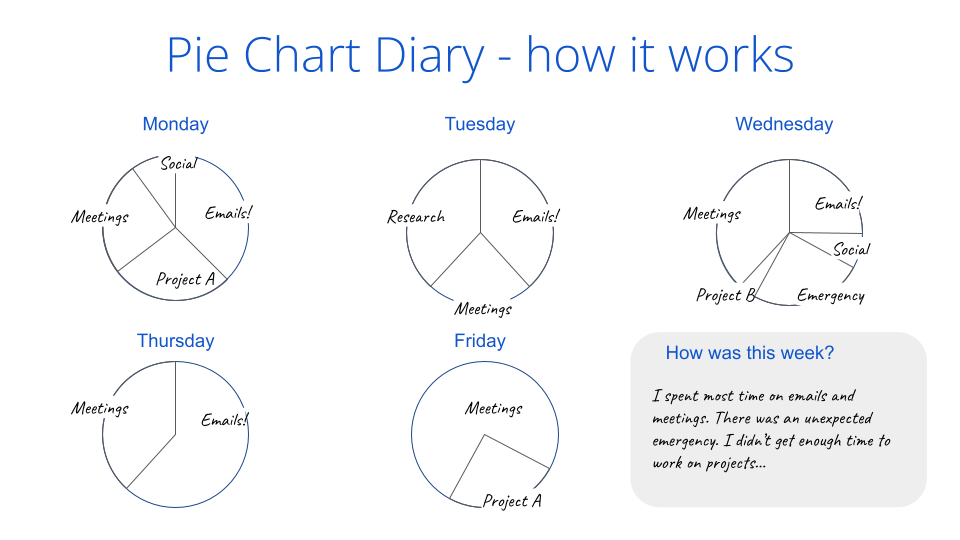
    For me, a bit of a spreadsheet nerd, I decided to track my time manually. I spend 2-3 minutes at the end of each day making a pie chart of what I had done that day. I continued to do this every day, always just before leaving my desk, and over the period of a month or two, I learnt some things about how I work:

    • I found that Tuesday, for example, were days when I never achieved my goals because they are dominated by meetings.
    • Wednesday mornings and Friday mornings were most productive for me.
    • I generally found time for things once I had a firm deadline.

    Here is an example of the Pie Chart Diary tool and how it can be used:

    Use it over a period of a few weeks or months, and reflect on:

    What do you spend most/least time on?
    What days of the week are you more likely to you achieve your goals?
    What is missing from your days?
    What could you change most easily to find better balance
    or to meet your goals?

    You can download this template if you’d like to try it out for yourself. Depending on your preference, you may want to print the template and write on it or simply use a blank piece of paper to make your charts. Or, if you prefer, use a spreadsheet or similar to track your categories and how you spend your time.

    The important part is to take a moment at the end of each day, and honestly reflect on what you actually did during the day. If there is something that takes up time, distracts you or interrupts you, consider adding it to your chart.

    When my dog was a puppy, my pie chart diary would have definitely included a “puppy” category as it took a lot of time out of my day to look after her.

    Look out for a podcast episode exploring the pie chart diary. As always, I’m curious to hear from you, what tools you use to track your days and what you learn along the way.

  • Hacks for Hybrid Working starts on October 24

    I am very excited to spot the announcement for Hacks for Hybrid Working, a new flex course starting on October 24th, in the September edition of the Reclaim Roundup which links through to Lauren’s preview post of the course.

    For many of us in Higher Ed, hybrid working is here to stay. So whether you’d like to create a better work/life balance juggling being on campus with working from home, or you are looking to move from crisis mode to a way of working that is more sustainable, healthful or simply a little more joyful, this course is for you. Join us to explore hacks to create a better hybrid workplace for everyone.

    For me, this is the ideal project closely related to Leading Virtual Teams, which is due to be published next month. I appreciate the opportunity to collaborate with Lauren and the amazing folk at Reclaim outside of my day job and to have the opportunity to share some of the know-how gathered on how to make hybrid working work for you.

    The cherry on top is that this course is free for anyone to attend and participate, so if you are keen to learn more, register here to receive event information.

    What’s the course about?

    Lauren explains in her post:

    We’ll be meeting over the course of 4 weeks beginning late October through November to unpack hybrid working and all that it entails. These sessions will be a continuation of our OER22 presentation, Building Connections with Virtual Teams, as well as our radio broadcasts that I’ve outlined in my post, Working Habits, Self Evals, and Finding Connection. I’m really looking forward to diving further into personal working habits that take shape in virtual/hybrid settings, evaluating our relationships with digital tools, and building out a Hybrid Working Roadmap.

    Here’s our topic list:

    • Week 1: Hybrid Working Unpacked
    • Week 2: Digital Tools in the Virtual Workplace
    • Week 3: Exploring Hybrid Working Hacks
    • Week 4: Complete your Hybrid Working Roadmap

    There is so much fun in store, including a special radio session and a SPLOT site alongside the course materials and tools we’ll be trying out.

    How can you take part?

    Sessions will premier on watch.reclaimed.tech/hybrid-working when the time comes, and we’ll also be chatting in the #hybrid-working discord channel! Also, make sure you check reclaimed.tech for weekly blog posts with supplemental resources, quick links, a SPLOT or two, and even some homework.

    When: October 24 – November 18
    Weekly video sessions each Mondays at 11am ET
    Live Q&A/discussion time on Fridays at 11am ET

    We are really looking forward to seeing you there 🙂

  • Submitted! My Senior CMALT Portfolio update

    In January I blogged about getting the process of updating my Senior CMALT Portfolio underway, and my intention was to blog monthly to share my process. Alas, we are not in late September and although I haven’t blogged or indeed progressed the task at hand, today I am doing both!

    I have updated my portfolio AND am blogging about it, so YAY!

    To recap, here is what I set out to do:

    Updating my portfolio

    ALT requires portfolios to be reviewed and updated every three years in order to maintain Senior Certified Member status and I am afraid my three years were up in late 2021. I applied for an extension (last year was manic for many reasons), and now I need to get underway with my review process.

    I have had a look at the guidance first (I haven’t actually ever updated my portfolio before) and here is what I need to do:

    First I am going to have a look at my original Senior CMALT portfolio. Then, I need to add the following sections:

    • Summary of recent work/practice (500 words)
    • Overview of CPD activities over the past 3 years, with 3 examples discussed and reflected on in greater depth
    • Updated future plans (300 words)
    • Updated Confirmation and date

    At first I was not sure what I was going to use as examples of CPD activities over the past three years yet, but I once I reviewed my list of CPD activities, I found it easy to choose the examples.

    You can have a look at my updated portfolio (which has been submitted for assessment).

    Sign-posting updates

    My portfolio is a Google doc and a number of related files, all shared by a folder. For the three year review I made a copy of my original document, re-named it and updated that.

    To make it easier to assess, I highlighted the updated sections.

    What I didn’t do

    When I first submitted my Senior CMALT portfolio in 2018, it was an updated and expanded version of my original 2016 CMALT submission. It formed part of the pilot group for Senior CMALT.

    In an ideal world, I would have liked to review and update/refine all aspects of my portfolio, including moving it over to a WordPress format, a task which I have been making little progress on for over four years.

    On reflection however, I feel that I have done what the 3 year review process is designed to do and found it valuable to take stock of my development over the past 3-4 years.

    I also find that the current format, the Google doc, really works well for me when it comes to making these updates. I am comfortable working in the format, so I don’t waste time fiddling with images or making it look more impressive.

    As an assessor I see some beautifully presented portfolios, and I am always full of appreciation for professionals who can not only showcase their accomplishments and reflect on them, but to do so with real style! Kudos to you folk out there who create bespoke images, video and more.

    Personally, having struggled to complete this task since September 2021, the thought of moving to a new format or doing a major update put me off. I am glad to have completed the required sections, which turned out to be fairly short at 500 words and 300 words and 3 examples of CPD.

    If you are in the same boat as me and staring at the portfolio review deadline, good luck! You’ve got this 🙂

  • Leading Virtual Teams: Team chat & bake

    Whilst I have been focusing on editing the book on Leading Virtual Teams, I have blogged a little less about what we have actually been up to as a Virtual Team… So this is a post about a great activity we have recently done: Team chat & bake.

    A mail box from Positive Bakes, including all the ingredients for the team bake.

    We chose a mail order baking kit for vegan & gluten free lemon cakes, which should be made easily and quickly within an hour which we set aside.

    As a team we considered whether we wanted to have video chat whilst baking or use text chat, and we all voted to use text chat only, so we posted messages and shared pictures as we went along.

    Photo of baking in progress… just mixing the dough for the lemon cakes.

    One of the things we really enjoyed about the activity was to spend some time together as a team without having to focus on a particular deliverable. It felt more like a social activity and we also enjoyed sharing jokes about how we were getting on with the recipe. It worked great to all make the same recipe as we could compare our experiences and tastes.

    Picture of baking in progress… lemon cakes fresh out of the oven.

    The cost of the activity for us as a team was around £20 a person, and it took around an hour for us to bake the cakes… and start eating them. We scheduled the activity to take place before lunch, enabling us to move from the baking activity to lunch which worked well.

    Photo of the final baked product – lemon cakes decorated with raspberry sprinkles.

    What worked especially well for this activity was the chat element, which allowed us all to engage as much or as little as we felt comfortable with. Combining hanging out virtually with making (and eating) some practically is a great combination to engage Virtual Teams – bringing a more tangible dimension to a distributed activity.

  • Updating my Senior CMALT: part 1

    It’s been three years since I first gained Senior CMALT Accreditation and I have found it extremely valuable to have this accreditation. I continue to undertake CMALT peer assessments and find this, too, an important way for me to continue my professional development.

    My Senior CMALT Badge

    Updating my portfolio

    ALT requires portfolios to be reviewed and updated every three years in order to maintain Senior Certified Member status and I am afraid my three years were up in late 2021. I applied for an extension (last year was manic for many reasons), and now I need to get underway with my review process.

    I have had a look at the guidance first (I haven’t actually ever updated my portfolio before) and here is what I need to do:

    First I am going to have a look at my original Senior CMALT portfolio. Then, I need to add the following sections:

    • Summary of recent work/practice (500 words)
    • Overview of CPD activities over the past 3 years, with 3 examples discussed and reflected on in greater depth
    • Updated future plans (300 words)
    • Updated Confirmation and date

    I am not sure what I am going to use as examples of CPD activities over the past three years yet, but I am going to get started on updating the other sections.

    Sign-posting updates

    My portfolio is a Google doc and a number of related files, all shared by a folder. For the three year review I am going to make a copy of my original document, re-name it and update that.

    To make it easier to assess, I am going to highlight the updated sections.

    I am going to start this week with the update process, and aiming to get everything ready within the next month.