Tag: #virtualTeam

  • Virtual Teams Book: Setting out as a Virtual Team… extract from Chapter 1

    Virtual Teams Book: Setting out as a Virtual Team… extract from Chapter 1

    Progress since the last post

    Since my last post, I have been working on Chapter 1 which is all about setting out as a Virtual Team. It’s been very rewarding to work on this chapter as it include a first hand account of the key milestones I experienced leading a team from the office to working remotely and I enjoyed re-reading some of the posts one month, six months and a year into the process. It was useful to reflect on how much the reality a few years later meets with the expectations I had at the beginning and what has changed.

    Next, I will be working on Chapter 5, which will explore equity and equality for virtual teams. I have left writing this chapter till last, particular because it requires the most research and also because I wanted to be able to reflect on issues that arise in the other chapters. Now that Chapters 1-4 are complete, I have my key issues to address in this chapter ready.

    I have completed drafts for four of the six chapters now, and I am on track to complete my draft of the whole book before the end of the year.

    As planned, I will be sharing extracts from work in progress (read this month’s extract below) and invite you to read along, reflect and share your thoughts.

    • Subscribe to my newsletter;
    • Look out for details of the virtual drop in sessions starting in November;
    • If you’d like to invite me to speak or write, get in touch with me directly.

    Chapter overview: Setting out as a Virtual Team

    This chapter is divided into two parts. The first part covers practical considerations for setting up virtual teams, including how to involve staff in the process, recruitment and selection for virtual teams and practical considerations such as choosing the right tools and platforms for the job, GDPR compliance and up-skilling staff.  

    The second part of the chapter contains a first hand account of an organisational transformation process I led to give practical examples of what can happen during a journey from office-based to blended or fully virtual team. 

    Draft Chapter extract

    Below is an extract from the first part of the chapter, focused on recruitment and selection.

    Distributed organisations offer a different value proposition to staff. Whilst there are downsides, too, the advantages of working from home and the flexibility that brings with it are significant: 

    Not everyone’s commute is that brutal, but companies and organizations can enable a more diverse and healthier workforce if they allow people to work remotely, at least some of the time.

    For instance, consider how difficult it is for a blind person, or someone who is confined to a wheelchair, to commute into an office every day by taking a bus for an hour each way. The commute itself is stressful and exhausting. Will that individual also be able to give their best to the work if they are already tired from just the commute?

    Or consider parents of young children who need to remain within a 10-minute drive to their children’s schools in case of emergency. If remote work is allowed, you gain access to a whole other talent pool of potentially highly-skilled employees. 

    https://www.informationweek.com/team-building-and-staffing/create-an-all-star-tech-team-welcome-remote-workers

    Once you have made the jump and offer flexible or fully home-working, recruitment needs to reflect that and enable you to find the best candidates in the larger number of applicants. Here are some practical examples of how to adjust the selection process for remote working: 

    Set out expectations clearly

    Ensure that role descriptions and adverts set out clearly that you offer in terms of flexible/home-working. Be as specific as you can about what you provide (e.g. equipment, financial support etc) and what prospective staff will need to have in place (such as a dedicated work space). If you have policies that are specific to home-working, refer to these and spell out precisely what your expectations are. Particularly in the post-pandemic workplace many people’s experiences of home-working may have been during a time of crisis, and won’t necessarily reflect what a ‘normal’ approach looks like long term. Include details such as ‘we expect all staff to be in the office on Wednesdays for a team meeting’ or ‘our normal working hours are between 9.00am and 5.00pm’ to help prospective candidates get a sense of how flexible your approach is. 

    Review your internal processes

    It can be difficult to find comprehensive guidance for recruitment processes that happen online and in most contexts your existing policies and training should continue to apply. That said, it is important to review what everyone participating in the recruitment process needs to be able to do in order to fully participate: if panel members struggle with the meeting software or reviewers don’t understand how your online score sheet works, then the recruitment process is going to suffer. It may seem like an obvious point to make, but even experienced managers need time to gain confidence undertaking fully online recruitment. Ideally, test your process by role playing / user testing all elements beforehand, so that you can put yourself into the shoes of a candidate and gain a sense of what their experience will be. 

    If your organisation uses a particular tool or platform for all meetings try to use the same platform during the recruitment process. Similarly, try to use as many of your familiar workflows when designing the practical elements of the interview. It the absence of a physical environment the candidates will get a much better sense of the organisation if the interviews happen on the same platform that they will be using day to day. In a sense, it’s the virtual equivalent of seeing your office or visiting campus. 

    Include remote-working questions

    It can be very helpful to include questions specifically about home working in the interview. It can help you learn more about each candidate and establish a rapport about some of the challenges you can encounter. For example you could ask something like: ‘Have you had any experience working from home previously?’ and ‘Can you expand on the main challenges you’ve encountered and/or perceive?’. 

    You might be surprised how considered responses to such questions can be, highlighting issues like isolation and maintaining boundaries between work and personal life. 

    It can also help establish whether candidates have experience working remotely in a solo capacity, e.g. running their own business or working as a consultant, and working remotely as part of a distributed team. Whilst there are many transferable experiences there are some important differences, such as the volume of communication required, having to be available for team members and meetings more frequently and having a shared sense of starting/ending a day. Often individuals who have worked remotely only in a solo capacity underestimate the extent to which this makes a difference and the interview can help establish a common understanding of what the organisational working culture is day to day. 

    Homeworking long term

    If you are offering home working full-time or some days of the week on a permanent basis, it is worth reflecting how this can impact on staff as things change either in the workplace or at home. For example, the tools you use as an organisation may change significantly over a period of five years and require constant upskilling. Virtual working often relies on tools that are frequently updated, impacting on workflows and requiring changes to procedures. Whilst this is true of everyone in the workplace to different degrees, the impact of such changes can be felt more keenly as a home-worker, for example if you start you week by logging in and suddenly your usual Monday morning catch up meeting won’t let you join or if you can’t reach work in domestic emergency because of software updates. Being reliant on tools and platforms that are updated according to Silicon Valley release schedules can cause havoc for even the most techy of staff and requires everyone to be adaptable to a larger degree than a traditional office setting where support can be provided at your desk or in your building. 

    Committing to working from home long-term can seem an easy decision initially, but can become challenging during periods of change at home, such as a house move, changes in family life or relationships as well as physical and mental health. What seemed a good fit initially may turn out to be a nightmare a year on. Any and all information that you can provide for candidates to help them reflect on the realities of working remotely in the long term is valuable and increases the chances of finding the best candidate. 

    Virtual Interviews

    In many cases the interview is the deciding factor in the recruitment process and if you are recruiting for a virtual team you will hopefully have experience in organising meetings online. For virtual interviews, preparing ahead of time is key. Common pitfalls include using a platform that is only available to individuals within your organisation, failing to ensure your interview is fully accessible and lack of appropriate support for panel members. Plan in time for the candidate to set up and test things before the formal interview starts and allow time for things to go wrong. First impressions in virtual interviews happen both ways and candidates have likely prepared very carefully so it is worth being very explicit with everyone taking part in the recruitment process how to represent themselves and the organisation. 

    As with the other elements of the recruitment process, established HR guidance will apply, but in addition, ask yourself what went wrong in bad meetings and interviews you have attended. Everyone has experiences of chairs not seeing their hand up, technical difficulties not being resolved, cameras being switched off when they should have been on and so forth. Even for experienced staff, checklists can be really helpful for virtual interviews and ensure that candidates have a better and fairer experience. 

    If you find yourself interviewing someone in a suit, sitting in front of a perfect office backdrop and never breaking eye contact whilst giving you textbook answers and at the other end you are hoping to have an informal conversation from your kitchen table with your cat walking across the screen then you are experiencing a class virtual interview fail. Interviewing online robs you and the candidate of many common assumptions about what’s expected and how to behave, so be as explicit as you can both in the way you communicate and what information you provide ahead of time. For example, if formal workwear is commonly worn in your organisation, make candidates aware of that. Similarly, if it is not usual for staff to use digital backgrounds and if it is acceptable to see each other’s (family) life in the background, you can make that clear as well. Consider carefully how you can eliminate as many factors that could distract you from the purpose of the interview as possible. You don’t want to focus on someone’s unusual virtual backdrop or their unexpectedly formal attire instead of the key questions around the job. 

    Experienced managers pick up a lot of clues when meeting candidates in person and that can help you take action to calm nerves and make candidates feel welcome. Online, the clues are still there, but it can be a lot harder to get beyond someone feeling nervous once you have had a technology fail or sound drops. Chairs should be prepared to start the interview in a manner that helps settle everyone and also pause proceedings if unexpected difficulties occur. In a later chapter we will specifically explore equality and equity in the context of working remotely and these considerations are particularly important in the context of recruitment starting with the connectivity and equipment required to apply to the tools and software required to take part in the interview process. A tool or platform that the organisation has a licence for and which is thus easily available to all staff may not be accessible to prospective candidates for example. 

    The tension between technology and human beings becomes apparent in other chapters of this book and in this section I have intentionally focused on recruitment processes that are conducted largely by human beings using technology as tools for recruitment instead of recruitment undertaken by machines. I have chosen to do so as this book is focused on knowledge workers and professionals who work in education contexts and automated selection processes are not predominant as yet, at least in my experience. 

    No doubt certain types of recruitment are becoming ever more determined by automated processes and artificial intelligence, and scenario based virtual interviews and skills texts can provide a useful addition to recruitment processes. Someone who comes across brilliantly in a prepared written application, virtual test or on email may not be able to communicate well in real time or on screen. So if the role you are recruiting for relies on communication and collaboration in a virtual team, it’s important to put human interaction at the centre of the selection process and ensure that the candidate you are appointing has the required skills for the role. 

    The set up for home-working is a huge factor in the long term physical and mental health of your workforce and it can feel much more outside of your control than an office would. 

    If appropriate you can include this kind of guidance in the information for prospective staff as well as in annual/regular processes for all staff. Ensure that it is a compulsory part of everyone’s practice to review and document their workstation and that you have a way to monitor this and address any issues that arise. 

    Many new or temporary home-workers start out working with their laptop on the sofa or at the kitchen table and then report back and neck pain or wrist problems. 

    The set up of the workspace should be an important part of the induction process and not left to chance as it’s your opportunity to get things right from the outset and avoid problems and illness further down the line. 
  • June & July ’21: A break, a book and back to running

    I was on a long awaited break at the end of June and I missed out blogging about what I did in June… and so you get double the monthly blogging goodness in one post 🙂

    First up… CEO updates

    Things were BUSY for me as a CEO in June, as I wrote in my report to Members of ALT. Not only did we hold our AGM, announced new Trustee appointments and a Board meeting all in the same week, but we also launched our Impact Report, which I am really proud of:

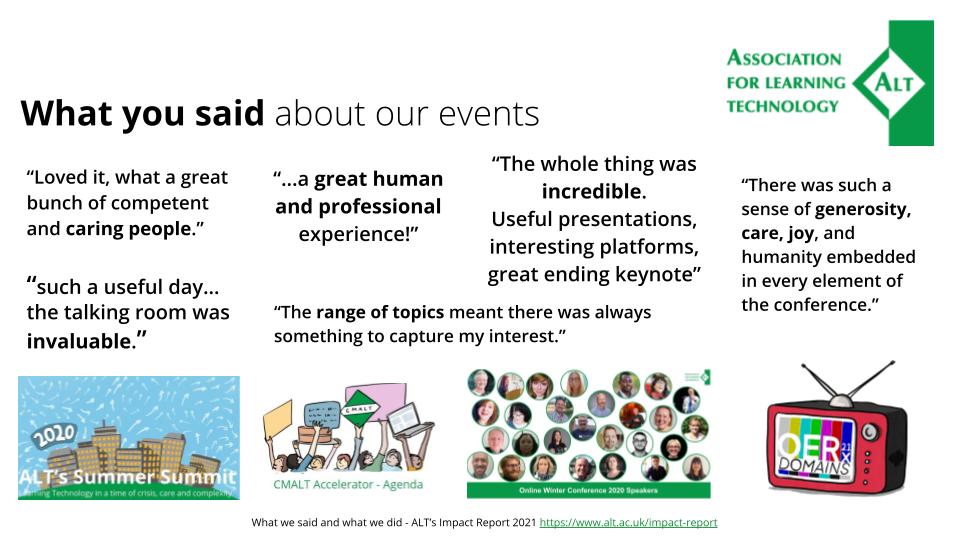
    A page from the ALT Impact Report 2021

    That was my week of the year to hit all the big annual milestones and I am glad to say that the feedback was excellent. After the year we and everyone in Learning Technology has had, it means a lot to me that I have contributed to turning things around for us. We are once again on an upward trajectory, and as an independent charity we have weathered the crisis, for now at least. That is a great achievement as a CEO and for my whole team.

    We also shared the consultation response to the draft ethical framework we are developing and this is a project very close to my heart. We conducted an open consultation from 7 May – 9 June 2021 and received 165 responses – thank you! The consultation asked for feedback and input about different elements of the framework:

    • Ethical principles for professional practice in Learning Technology
    • Putting principles into action – reflective practice, practical tools and a checklist

    Work is now underway to create the resources which will launch in September. Speaking of September…

    There is also a very exciting (and online first) ALT Annual Conference on the horizon…! Even after running a whopping 157 online events in the past year with over 5,000 participants in total, we prepare for the Annual Conference somewhat differently. It’s our biggest event, our flagship conference, with a lot of history, and meaning for our community.

    The kind of value we want to provide goes well beyond sharing solutions and disseminating findings. To me, and to many others, ALT’s Annual Conference is ‘not just another (online) conference’ but it is an opportunity to make plans, to connect to colleagues and to energise and mobilise your networks for the year ahead. That kind of energy and inspiration is much needed and precious. Here is a blog post sharing what I’m hoping for for #altc #altc21.

    Personal update, birthday and my break 🙂

    And now… books!

    I absolutely LOVED reading Where you are is not Who you are by Ursula Burns (thank you, Catherine, for the recommendation). It’s an awe inspiring and awesome read and really made me think about being a CEO in a new way. It was fantastic to read about the reflections of someone who has had a successful career as a principled leader.

    Image

    Another great read from this past month has been Girl, Woman, Other by Bernadine Evaristo. And all the while, I was listening to DS106 Radio of course, and took part in the 24 hour marathong that Jim Groom organised to celebrated it’s 10 year 6 month (106) anniversary. You can read my love letter to emergency broadcasting here.

    And… I have finally managed to reclaim my morning runs.

    But. Most excitingly I have started to finally write the Leading a Virtual Teams Book and I am now two chapters into what I hope will be a year long writing project. And of course, you can read along:

    This month, I am writing Chapter 3: Leading a virtual team:

    Is leading a virtual team very different from leading a team that is geographically co-located? This chapter explores what the reality of leading a virtual team is like for managers and leaders, reflecting on the ups and downs of leadership and sharing ideas for how to find your own virtual leadership style.

    Exciting times and hopefully some useful output for everyone who finds themselves leading a virtual team.

    Quick links

    • Key insights for 2021 – a presentation for Russel Group Universities IT Directors (RUGIT), 14 July 2021;
    • Developing ethical approaches to learning technology, a Fair Comment article, Common Wealth of Learning, July 2021; 
    • Learning And Teaching Reimagined: Understanding The Response To COVID-19 And Exploring The Future Of Digital Learning And Teaching @ The Future of Blended Learning in Higher Education 2021, keynote, 17 June 2021;
    • Pedagogy and Practice when Teaching Online, webinar, 10 June 2021;
    • Open Apereo 21 #ALT & #Apereo Screenside Chat: ‘Ethics & Learning Technology. Perspectives from the Pandemic’. With @bellaabramsIT, @drchuck, @14prinsp, @MarenDeepwell & @iandolphin24 – 8 June 2021;
  • Virtual Teams: Creativity Hacks for Virtual Teams (and why we maybe do like emoji after all)

    Hello and welcome to this month’s post on leading a virtual team. In this post (cross-posted here) the two of us, that is Martin Hawksey (@mhawksey) and Maren Deepwell (@marendeepwell), continue our series of openly sharing our approach to leadership. 

    If you are new here, you can catch up on earlier posts and podcasts or find out more about ALT, the organisation we work for as senior staff. We really appreciate comments and feedback and welcome questions or suggestions for future posts. 

    This time we get creative as we share our favourite ways to have some fun, create, collaborate and share. We also have another think about emoji.. which a year ago we gave a rather cold review. 

    July

    Maren: When I started thinking about this post, I realised that creativity is a much bigger part of how we collaborate as a team than I initially thought. I’m excited about having some fun and sharing a few of my favourite ideas from the last year, starting with this example of an alternative team portrait:

    We’ve made others, one with biscuits representing each member of the team particularly sticks in my mind, but this is definitely a favourite. A bag full of craft supplies, a table, an hour of chatting and making together and you have a fun, creative portrait. I much prefer this to posing for artfully smiley photos that end up on social media and the process of making the portrait together acts as a catalyst for conversation. 

    Another recent example of a bit of remixing fun as a team was creating our own Pet Top Trumps, featuring some of the four pawed companions we have as home workers: 

    One of the challenges of remote working is to find ways to interact with each other informally, to have some fun and that is particularly important when things are busy! Creating and sharing our Pet Top Trumps developed some new skills and really improved our spirits on a hot, long and busy summer day. These cards were remixed using the Fabulous Remixer Machine, which we also use in other creative ways. 

    Martin: Informal interaction is a really interesting point and thinking about it probably one of the toughest areas in a distributed team to get right. It’s quite easy to add informal conversations to the start/end of video calls but more challenging when catch-ups or team calls aren’t scheduled. It’s also probably easier to incorporate informal chat in one-to-ones because with our team meetings, particularly in Annual Conference prep mode, it feels like there is pressure that chatting might be delaying someone else from getting back to their to-do lists. In the past during busy periods we’ve also scheduled coffee breaks where we can hangout together. One of the challenges I find is when these have been purposefully set up they lose some of the spontaneity that you might get in a traditional office environment. Something I’ve found that works well is working with someone on a piece of work whilst in a video call with them. This could be a task like writing a piece of text together or working on some spreadsheet data. These moments are also useful for those serendipitous moments when you discover something new which might be a different way to do a task or just something you didn’t know about the other person. Within our team we also use a group text chat, which allows everyone to say hello in the morning and gives us opportunities similar to an office based chatting across the room. Currently we are using Google’s Classic Hangouts Chat for this which doesn’t have some of the additional features you get in the newer version, or other tools like Slack. Having used newer chat interfaces as part of other communities I’m part of I find my original dislike of emoji’s and reactions, which we talked about last year, slowly being eroded. I’ve yet to use these tools in the context of a virtual team and I can’t wait for Google to integrate the new Hangouts Chat into Gmail. When we talked about emoji almost a year ago you had similar hesitations for using these in a distributed team. Has your own view changed?

    Maren Bitmoji

    Maren: No. Yes. Maybe. My emoji literacy is still poor. I am one of those people who has to search for explanations of what ‘:s’ means… someone who having made her first ever Bitmoji promptly never made a second one. My icon vocabulary is rudimentary at best. I speak more Greek than emoji! That said, sometimes only a ‘:)’ will do, so I adjust how I express myself according to my audience. I value instant chat a lot for spontaneous interaction. Like you, I’m a year further into my experience using more ‘engaging, agile, responsive…’ chat interfaces. My feelings are still very mixed: I dislike that at times the volume of reactions/interactions can make the interaction meaningless, it becomes noise. I find the amount people have to actually engage or think about how they are reacting is minimal, which devalues the increase in interaction for me. I prefer someone not engaging to token reactions. I object to the notification push these interfaces try to dictate, i.e. ‘check who has liked your comment in the last hour…’. I don’t want to be notified in this way. And then there is context. Someone being silent can speak volumes and if they click the occasional ‘like’ I might miss their silence. So there are still a lot of downsides to the world of chat and emoji to me (and chatbots, for that matter). On the other hand, I love the playfulness, the fun, the sense of humour, creativity and flexibility these tools enable us to have. And that is really important in a team setting. I had an experience today discussing email, and a colleague pointed out a way in which we could save emails between us. The suggestion was prompted by them understanding how I work better, getting to know what’s important to me and why. A whole range of formal/informal communication led to that realisation, and to me, that’s what matters. Like drawing or walking or making something, I value things that get us thinking together. 

    Martin: In the case of reactions I can see a distinction between ‘likes’ in a personal setting compared to a professional context but at the same time, as we talked about in our last post, there is often a blur between social networks/chat in a work and personal life setting. I’ve only came across bitmoji recently and while I’ve seen others use them they are not something I’ve played with a great deal. Given the level of expression and potential outlet for creativity you get from some of the designer apps perhaps I should. Something that has put me off, particularly with the basic bitmoji you get with built-in virtual keyboards for Android, is the expression always seems a bit extreme for my mild mannered personality. While I’m becoming more inclined to emoji the next problem is given I’ve previously stated I dislike them in the past it feels more awkward to start using them purely because of my suborn streak. Given the reliance on online tools for virtual teams it’s perhaps worth remembering new tools get added, existing tools change in functionality and tools even get discontinued which means there is a degree of continual change with personal choices so having an organisational cultural alignment that supports this is important. In terms of creativity one of the aspects of my job I really enjoy is the opportunity to produce and collaborate on some of the artwork we use. This includes things like our Annual Conference splash screens to remixing some of the artwork and popup banners for the OER conference. Having recently bought a sticker machine I’ve been enjoying providing one-off creations. 

    CPD badge

    Maren: Stickers are a great example of a creative outlet. I also came across this digital badge, which I made on a drawing app and using Google slides, as part of the team appraisal process a couple of years ago. Making one/off badges for individual staff is a quick, creative way to provide recognition and feedback with a twist. Another example of a creative approach to feedback is the ‘positivity by post’ exercise we did recently. That involved using a template to send each other feedback by post and that was really interesting in that it was a) positive feedback only, b) handwritten and c) delivered by post rather than email. For me personally changing the method of communication made the process both more creative and impactful. The final example I’d like to mention is clothing.. shoes, t-shirts, hoodies:

  • Virtual Teams: special #femedtech podcast edition

    Hello and welcome to this month’s post on leading a virtual team. In this post (cross-posted here) the two of us, that is Martin Hawksey (@mhawksey) and Maren Deepwell (@marendeepwell), continue our series of openly sharing our approach to leadership.

    If you are new here, you can catch up on earlier posts and podcasts or find out more about ALT, the organisation we work for as senior staff. We really appreciate comments & feedback and welcome questions or suggestions for future posts.

    February

    Maren: In the past year we’ve each volunteered as a guest curator for @femedtech (here’s a link to my post on that). Promoting greater equality in Learning Technology and in our distributed organisation in particular has become an important part of our professional practice. In 2017 I gave this talk at EdTech17 and since then I’ve included something about equality in most of my talks, following the example of others to use my voice to raise awareness.

    As my turn to volunteer as a guest curator is coming up just after International Women’s Day on 8 March and we are contributing a joint keynote on promoting equality in a distributed organisation to a related event at the University of the Highlands and Islands, I’ve started to reflect on what I’ve learnt over the past year and come up with some ideas to discuss in this post and podcast: first, I’ve discovered lots of my own blind spots – issues and inequalities that I wasn’t aware of previously. The #femedtech network and also working in the Open Education community has helped with that (although there is a lot more to learn). Also, our work on policies for remote working has prompted me to question what I can do, what I can change, to help address any structural inequality within our organisation, by for example reviewing policies for flexible working and family leave. Another thought is that reading the narratives of others, recounting personal journeys, precarious work and family situations, career challenges, work life balance problems and so forth, made me reflect on how far outside of any comfort zone I usually work. And that is a sobering thought, particularly as I am in a position of relative privilege.

    Martin: It’s interesting to consider equality and diversity as part of a distributed team. A number of the discussions I’ve seen around gender equality highlight the benefits of employers providing better opportunities for flexible working. Another factor to consider is the physical workplace can be very gender bias. The allocation/distribution of toilets is often mentioned, but I think there are lots of other environmental factors which are often overlooked. I don’t know whether virtual workplaces can be gender bias, perhaps you have thoughts on this, but it’s interesting that in a 2017 survey on Jobsite they reported that 76% of female tech professionals thought businesses offering remote working were more likely to retain top talent. Blind spots is one of the biggest challenges, not just within the workplace, but society as a whole. Before attitudes and approaches can be changed the issue first has to be acknowledged. In the case of gender I think a lot of guys don’t see a problem, or even if they do see it as a problem it is something that they shouldn’t be concerned about. As part of my curation period for @femedtech I came across the “ICTs’ for Feminist Movement Building – Activist Toolkit

    A part of this Frances Bell highlighted the ‘Principles of Feminist Communication’ which is part of the toolkit. A principle that caught my eye was “we produce content in a democratic manner. Women take the lead. The process serves to build positive power”. In the case of @femedtech it is absolutely important that women lead this community, but for it to be successful it has to reach those who have their own blind spots. As such I was grateful for the opportunity to curate this community for a short period. As I explained to a friend the best equality and diversity training I had ever been on.

    Maren: I agree. It’s an enormously valuable experience. Physical workspace is an interesting area when it comes to promoting equality and I’d include conference/meeting spaces in that. There are many aspects to this, even the seats you sit on: for example, I was on an all women panel once conducted on a high stage on bar stools. Not great when panelists are wearing skirts and the camera is located five feet below. Or dress codes for work, including it still being legal to stipulate women wear heels. And don’t get me started on the topic of pockets

    . Working closely with the tech sector a different kind of stereotype dominates, the genius young start up CEO or coder, mostly males who work all hours of the day. Having other responsibilities outside of work or not being able or willing to give up 100% of your time all of the time can easily be looked down on. If you open up your perspective to challenging discrimination based on age, disability, gender reassignment, race, religion or belief, sex, sexual orientation, marriage and civil partnership, and pregnancy and maternity then the challenges just keep getting bigger (ALT’s policy on equality & diversity underlines this). Which is why I feel so strongly that it’s also a matter of personal responsibility to help promote greater equality: everyone can make a difference within their personal practice, their immediate sphere of influence or even their own mindset. We can each educate ourselves, try and become more aware and raise others’ awareness. I am always inspired by projects such as the Feminist Internet, Women in Red, Uncommon Women and many others that do amazing things. On a related note, I saw a tweet the other day where Kelsey Merkley shared a childhood memory:

    It made me smile because my dream jobs growing up were bin man (because of riding at the back of the truck), hot dog vendor (love of ketchup), astronaut (amazing science teacher), judge (inspired by Captain Picard) and my fancy dress costume of choice was Poseidon (trident) and circus director (top hat). It never occurred to me that these weren’t ‘girly’ choices. Nowadays I buy books like Garth Nix’s Frogkisser for the younger readers in my life, so they can develop imaginations in which the White Wizard can be a teenage girl. And I indulge in books like those written by Ursula LeGuin, which have diverse lead characters and cultural contexts so that my own imagination grows in richness and diversity.

    Martin: I’m hoping over the generations there is more equality. One issue we have is people just live to darn long so even if this is the case we still have a long time to wait. Just before our last Trustee meeting and knowing I had the prospect of a 4am start I decided to stay up and watch The Great British Sewing Bee. My interest in sewing is largely as a spectator, but I’m quite happy to put buttons back on, I also sewed on all of my daughter’s Brownie badges. People who know me well will recognise me as a maker and DIYer so perhaps not a surprise that I’m interested in this type of programme. When I was a kid I remember one year asking Santa for a sewing machine, I don’t recall it being a particularly positive reaction to that request and think I ended up with a bike instead. As someone with their own child I feel I’m more conscious of not imposing stereotypes. Some of my friends/family are teachers and when we have spoken about this in the past they say they feel there is greater openness and acceptance in areas like sexual orientation in that generation. Thinking about this post and how it relates to equality in the workplace one question I have is there a danger that remote working will be used to allow organisations to have a diverse workforce but also prevent people having full freedom of expression? An example I have in mind is a number of organisations, notably the education sector, now provide employees with the option of branded rainbow-coloured lanyards. This is a very visible support of the LGBT+ community, an act that would have far less public impact for a remote workforce. Do remote workers have the same degree of expression as office based staff?

    Maren: That feels like a good jumping off point for the podcast we are recording for this post. There’s so much to unpack. Like many of the issues we discuss in this series this is a topic that touches on very personal, human questions and reaches all the way to formal HR policies, working with diverse stakeholders and keynote speakers and even our organisation’s strategy. I’ve also explored this in my Senior CMALT portfolio to show that this is a key element of my professional practice.

    There’s a person on the image below who has green hair, and that’s intentional. Sure, it’s a small thing, but it’s important because of the thought process that went into it. It’s putting values, policies even, into practice in a playful and powerful way.

    https://soundcloud.com/mhawksey/openly-sharing-our-approach-to-leading-a-virtual-team-podcast-3

    More to read and listen to:

  • Virtual Teams: When things get personal

    Hello and welcome to this month’s post on leading a virtual team. In this post (cross-posted here) the two of us, that is Martin Hawksey (@mhawksey) and Maren Deepwell (@marendeepwell), continue our series of openly sharing our approach to leadership.

    If you are new here, you can catch up on earlier posts and podcasts or find out more about ALT, the organisation we work for as senior staff. We really appreciate comments & feedback and welcome questions or suggestions for future posts.

    January

    Maren: Hi. I wanted to start this post by talking about a small professional development experiment we did this month. I came across some online courses run by Google and as we use Google Apps for Education this seemed like a nice way for all of us to do some free CPD, use a familiar platform for a new purpose and have a bit of fun as a team. Everyone was free to choose their own topic, and the plan was to report back at a team meeting and share three things: something you learnt, something you found challenging and something you would like to find out more about. I chose to spend my hour learning more about digital wellbeing (maybe not a new topic, but definitely time well spent) and one of the ideas that I took away from the course is to have ‘device-free’ meetings to encourage individuals to be more present and engage with each other. On the one hand not being distracted by notifications etc makes complete sense to me. Giving others your full attention is important. I wonder what else makes for good online meeting etiquette other than not checking notifications? On the other hand I am not sure that staring at each other’s video feed is always the best way to get people thinking or talking. That reminded me of this visual thought ‘Meeting around a document’ and how sometimes having a walk, an actual one or a virtual wander through a spreadsheet, might be a better way to connect, work, talk together. Thoughts?

    Martin: I also did the digital wellbeing course, mainly because knowing you had already done it we’d have something to discuss. Bryan’s visual thinkery is very apt particularly for distributed teams where we rely on real-time collaborative documents. The thought of working on a MS Word or Excel document and emailing it around as an attachment now seems completely foreign to me. There have been some projects where this has been required because of the limitations Google Docs has when embedding complicated graphs. When I have to go back to this technique now it just seems like such an unproductive way of doing things and I see lots of benefits from ‘meeting around a document’, particularly when combined with video conferencing. It does come with some challenges, for example, making sure everyone is on the same page or spreadsheet tab. As a result I think it requires a little more awareness than if you were working on a document face-to-face. There are also small things that can easily be forgotten. For example we have two colleagues with the same name and there was a moment recently when we all had to be reminded that when meeting virtually, unlike a physical meeting, you can’t easily make eye contact and direct your comment to someone as a result we need to remember to let people know which person you are talking to. You could ask if there is any point in enabling cameras during virtual meetings as often when you are collaborating on a document you might be viewing it in the same window as the meeting but it gets lost underneath. Personally I find even in these situations having video is important, particularly when there are more than two of you. It gives me reassurance that the other person is ‘there’ and not been dropped from the call. Do you have any tips on maintaining focus while in video calls?

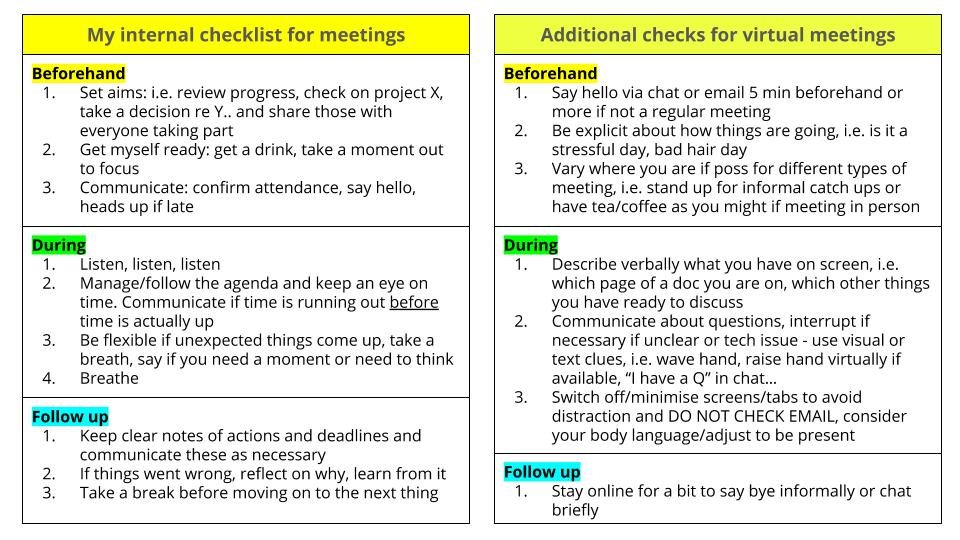
    Maren: I have a mental checklist for meetings that I use for meetings regardless of how they happen. I’ve added a few examples of techniques specifically relevant for online meetings.

    When I lose focus in a call, most of the time that’s because my priorities are wrong: instead of what’s important, I’ll focus on what’s urgent or worse, I get distracted by what’s loudest. That could be emails pinging into my inbox or notifications coming into my phone. Or it could be something more personal like having a bad hair day or feeling self conscious about my new glasses (no one actually noticed). Outside of meetings there is a bigger issue around focus I’d like to think about: in roles like ours, as senior staff, we should ideally focus on what’s important, manage what’s urgent and oversee what’s loud or noisy (noisy, but part of the day to day churn of running the organisation). In practice as the pressure we are under goes up, the higher the workload for whatever reason, the less good I become at delegating and the more prone to get stuck in and simply ‘do’. Working in a distributed team some of the physical prompts to prioritise are absent: for example, in a traditional setting you may have team meetings in one room but meet the Board or plan strategy in another. In our virtual working environment all meeting rooms are equal – it’s up to us to create a different atmosphere, a different focus. Similarly, when my former boss was in the office and working on something he would close the door to indicate that he was not to be disturbed unless it was urgent. Now, it’s up to me to shut down my inbox, tell everyone I am busy via chat or update my calendar and make that space to focus and have no distractions. It’s a bit like training for a race, preparation & practice are key. And a sense of fun/a bit of humour goes a long way to get you through rough patches.

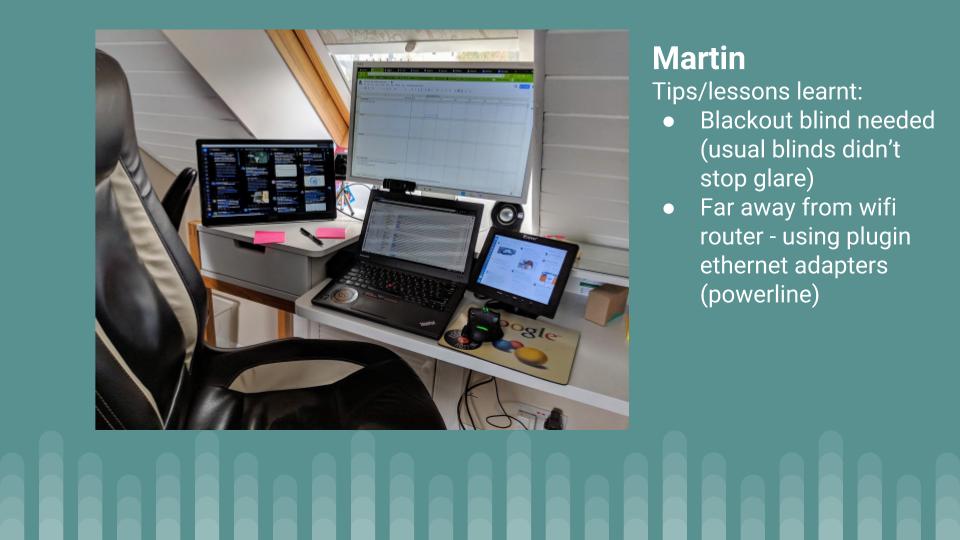
    Martin: Great checklists! I was recently invited to a meeting. The person co-ordinating the meetings was conducting interviews and used Google Calendar appointment slots to allow me select a time that suited me best. As part of the sign-up the calendar slots included some tips on meetings like the prompt “what is the desirable outcome of this meeting?” and a link to Wikihow: Prepare for a meeting. I didn’t think that the Wikihow guidance is that great but liked the idea of using appointment slots and those slots being prefilled with some guidance text with the option for the person taking the slot to edit the text. In terms of ‘noise’ I’ve followed Alan Livine’s advice and will now often put the radio on in the morning. Generally meetings later in the day mean I end up turning it off and forgetting to put it back on. To also reduce the noise of notifications I generally always have Windows 10 Focus Assist on which reduces the number of pings and alerts you get. As part of our year end we are also conducting a “home working setup – annual check-in” where we are encouraging our team to share a photo of their setup and include a couple of tips/lessons learned. As I look after ALT infrastructure and oversee our social media I never like to be too far away from being contactable – if our website goes down I want to know about it. As a result my home setup has a lot of screen real estate to help, the downside is there are a lot of potential distractions:

    Something else that features in this pic are post-it notes. I’ve got various online note tools, mainly Google Keep, but still find particularly when our workload increases that the processes of prioritising what I need to achieve by writing it down very useful … it’s also always nice to cross something off when complete. One downside of physical notes relates to your comment about closing office doors when you are busy. There is no easy way for the rest of the team to see what is on my notes. What I really need is a view access only option on Google Keep…

    Maren: I hadn’t tried out the calendar slot scheduling, so that’s a new tip for me. And I definitely agree we should support a feature request for view only Keep notes! With such frequent iteration on the platform, I don’t always spot new things or indeed explore the potential of innovations as they appear. A recent week of A/B testing left me rather puzzled as my interfaces suddenly looked different to everyone else’s. I suppose it’s the flipside of being “agile”… and as the in house family tech support that many of us who work in Learning Technology are, I frequently try and explain to elderly users, i.e. my mom, why indeed she has to adapt to the way things are done afresh every few months. It plays havoc with our family tech manuals (my mom was an accountant, we have manuals…) and is REALLY unhelpful for people who have trouble with technology to begin with. I am not going to mention here the problems even blogging brings with it just now thanks to the recent WordPress innovations… there’s plenty of that discussion already going on. My closing thought for this month’s conversation is really about how personal all of this is, how much of a personal issue managing our relationship with technology and our wellbeing (online and physical) is. Sure, it’s an obvious point to make, but I wonder how me having appointment slots in my calendar may feel to someone who is used to having a chat about when to meet? I often underestimate how small actions like this may come across at a human level. I feel a whole new blog post coming on, so I better pause here… any final thoughts from you?

    Martin: I completely agree that our individual relationship with technology varies as does the level of confidence we individually have when faced with change. Someone you chat with to arrange a meeting might prefer picking a calendar slot. This really underlines your point that this is all very personal, one thing that works for one person might not for the next … let’s just be grateful we are a team of 6, not 60, 600 or even more than that.  

    More to read and listen to:

    Getting Virtual Teams Right (Harvard Business Review)

  • Virtual teams: a special podcast edition

    Cover image: Special Podcast Edition: Reflecting on the first year leading a virtual team

    This post continues the series on openly sharing our approach to leading a virtual team – a joint project with Martin Hawksey (cross-posted here) for which we write a monthly blog post and this time recorded a podcast for you, too.

    What a year…

    With the transition to becoming a distributed organisation and one year of leading our virtual team under our belt, we reflect on the highs and lows, the good and the bad and most importantly on what’s ahead as we continue to develop this project in open practice.

    Maren: There’s so much I’d like to talk about that it’s hard to know where to start. First, I’m excited about how a transition plan on a spreadsheet has turned into reality, how the organisation we lead has changed over the past 18 months. Second, there’re 101 things I’ve learnt along the way, from how to set up a PO Box when you are a distributed organisation (harder than you think) to how to manage a virtual team and all that that entails. And then there are all the things I’ve discovered about being a home worker… during summer holidays, family emergencies and when things go wrong. It’s never been boring, that’s for sure!

    How about how? What’s been most surprising and rewarding this past year? What are you most keen to develop next? This time next year… will we be millionaires?

    Martin: Time has really flown by, it only seemed like yesterday that we started putting in place some of the operational changes for moving to a distributed organisation. It’s only the fact that I’ve started to receive renewal notifications for annual licences for things we didn’t require before in a host institution that I’m reminded of the realities of the changes we had to put in place. In some ways I have to say that the most rewarding thing in the past year has been the shared monthly posts we are doing. When we started I thought it would be useful to share with others the journey we as an organisation were on. I’ll let others decided whether it has been useful or not, but regardless I’ve personally greatly benefited from the opportunity to reflect on progress and consider where we go next. Reflecting on December something that stood out for me was in September’s post on the ‘serious upsides of working in pyjamas’, we discussed remote worker wellbeing. In December as the cold has set in it’s been noticeable how we’ve swapped pyjamas for thick jumpers and blankets. As a remote worker you’ve the benefit of having more control over your working environment. The downside I find, particularly if you are a skinflint like me, is you are reluctant to put the heating on if you are the only one in the property. As an employer our organisation is limited in what we can do. We all get a home working allowance but that is limited and it is up to us individually to decide how it is used. Seasonal variations in remote teams wasn’t something I had anticipated. Do you have any standout unanticipated moments?    

    Maren: It often feels to me like this whole year has been one long unanticipated moment. There’s definitely a lot we could talk about in that whole area of remote working and wellbeing. Writing these posts has helped us both become more aware of the complex issues involved and it’s interesting just how much there is to unpack here, both from the perspective of a small employer and ourselves as individuals.
    Another question you touch upon is whom this kind of open leadership practice is for. Our readers include our own team, the Board of Trustees whom we report to, Members of ALT and our professional networks. On Twitter, LinkedIn and our own blogs as well as at events we’ve been getting comments, questions & feedback – and many of them are about open practice rather than the virtual org transition. Senior staff don’t often adopt the approach we are taking, to discuss the inner workings of their organisation as they happen. Bringing our Learning Technology open practice into how we lead the team and managed the transition feels like an important step forward. It’s prompted me to think differently about innovating, about improving things even if they are new/in progress. No one gets to start new things on a blank slate or with everything in steady state very often. There’s usually legacy issues, deadlines, risks etc from the outset. By making time to focus on how we run the organisation we’ve been able to innovate much more in that area and that’s been exciting.

    Martin: You touched upon space in terms of time and locations such as various social networks. Something I’ve been thinking about more is mental space. This is an area we’ve talked about a couple of times, but a recent experience reminded me how important I find it to compartmentalize my workspace and personal space as part of being a remote worker and also how difficult it can be sometimes for others to understand this. Recently my parents were staying with us for the holidays. At home my ‘office’ is also the spare bedroom. Having a dedicated space for me to work is very important, not least it means I can just go to work each morning and not have to set up anything, I just switch on and go. This year my parents wanted to stay a little longer which meant they’d still need the spare room while I went back to work. As part of this they said they would make sure they would be out of the spare room/my office by 9am each day. Initially I didn’t say anything but in the end had to say to them it wasn’t going to work for me. The issue I had in my own mind is going to the office as a remote worker is more than just being at your desk at 9am. With suitcases and clothes lying around I was worried it was going to feel less like an office. Knowing my parents were in the house I was worried it was going to feel less like being at work. I appreciate for many these things sound trivial, but for me they are very important. If I worked in a traditional office in my own mind I knew it was going to feel like having my parents sitting in reception all day. I think this aspect of remote working can be hard for others to appreciate. Have you had any similar experiences?

    Maren: I’ve not worked from home for as long as you have and regular travel is a big part of my role, so I come to this from a different angle: I have created a mental work space that I can function in properly on a train, hotel room or at an event. I feel comfortable in that space. And it’s probably why I have a strong attachment to my chromebook, stickers and all. That said, creating that space in my head at my home has been tricky! Trickier than I had anticipated especially given how rarely I was desk based before working from home. And like you I prefer having physical space that’s ‘mine’ for that – but limited space, my cat, family etc really challenge that at times. I hated strongly disliked working in an office and I feel working from home is a hard won privilege. I love working from home and it suits me really well. Still, I have had to rearrange my set up at least 5 times in the first year, moving furniture, changing equipment, adjusting to how the sun comes in through the window and so forth. I have ended up with a yoga bolster as a footrest and using the windowsill as a temporary standing desk. I’m also a carer for my parents so my work/family lines are already blurry, but working from home has made that more… prominent in my mind. I may have also come to the conclusion that I would ideally need a bigger house! My work space is adjacent to the family bathroom and the main space to dry laundry as well as the notional spare room. Like you, I have to try and articulate my workspace not only in my own mind but to family, friends, guests & my cat. It reminds me of a Seinfeld episode in which George is talking to Jerry about his new girlfriend making friends with his other friends, how those two parts of his life are starting to mesh and he feels panic because he fears losing space to be ‘Independent George’ and end up being ‘Relationship George’ all of the time he shouts: ‘worlds are colliding, Jerry!’ I feel similarly about working from home – sometimes it seems like worlds are colliding.