Tag: #leadership

  • Virtual Teams Book: Trust & surveillance… extract from Chapter 3

    Virtual Teams Book: Trust & surveillance… extract from Chapter 3

    In July, I drafted the first chapter of my book about leading virtual teams. Head over here to learn more about the project.

    Progress since the last post

    Since my last post, I have been working on Chapter 3. This includes some of the most interesting sections relating to Learning Technology and Open Education, in particular a section on open approaches to leadership.

    The chapter was harder to write because I had a lot of things I wanted to refer to which would be covered in other parts of the book, which don’t exist yet. On the plus side, I have managed to get into a good routine with my writing, and I found a regular writing (half) day, which helps a lot.

    Posey, the puppy, will soon start to spend more time in my office, and I am looking forward to having her company as my writing buddy. Pictures to follow.

    For the next four weeks, I will be working on Chapter 2, on Building a virtual team spirit.

    As planned, I will be sharing extracts from work in progress (read the first extract below) and invite you to read along, reflect and share your thoughts. As part of the book writing process, I will also organise virtual drop in sessions which are open to all and free to attend and there is a regular newsletter with updates about the book and upcoming events or get in touch with me directly.

    Chapter overview: Leading a virtual team

    In what way is leading a virtual team different from leading a team that is geographically co-located?

    This chapter explores what leading a virtual team is like for managers and leaders. We will discuss the challenges of leadership that are specific to a distributed workforce and explore ideas for how to find your own virtual leadership style. 

    It’s worth taking a moment to reflect on your own journey to leading a virtual team. Consider for example, what your experience has been to date? Have you mostly managed people in co-located contexts, in offices or on campus? Have you previously managed staff who were home-based or had flexible working arrangements? What was a successful experience of working with a virtual team for you? 

    Many of us get to a position of having to manage a distributed workforce with little or no prior experience, particularly if your organisation has only recently introduced remote working or you work for a start-up company. 

    If you do have experience to draw on, consider how this shapes your expectations of managing your current team. Reflecting on your own experiences, are there things you would do differently in future or approaches you feel worked particularly well? 

    I want to take a reflective and open approach to exploring what leading people whom you may never meet in person is really like in the long term. This is important as part of being effective as a virtual team manager is to narrate and communicate what may be self-evident in an office setting. And in turn to inspire your colleagues to make a greater effort to communicate with you and each other. 

    Whilst many of the examples discussed in this chapter are drawn from my experiences in the charity and education sectors, they are more broadly applicable.

    Draft Chapter extract

    Below is an extract of the draft chapter. This is from the middle of the Chapter, ahead of the last section. Unfortunately the footnotes haven’t come across, so I will do my best to fix that for the next time.

    Trusting in yourself and others

    A common question about working remotely I get asked is how I manage staff without supervising their work in person. How can I trust things are being done without seeing it, without being there to check and so forth. My answer is that being part of a distributed team is a two way street. Staff need to want to work remotely, to adjust or learn how to do things in a way that works for them AND the organisation. Everyone needs to be willing to make the most of the opportunities that being part of a virtual organisation offers, you can’t do that for them.

    When you see people in person, you get a lot of clues as a manager about how things are going. You probably have opportunities to see people interact, chat with each other, or bend over a computer screen together to solve a problem. When you lead a distributed team, opportunities to gather such information are more limited, but they are still there. 

    Building trust as a virtual team is all about establishing a baseline of communication and behaviours that help everyone work better with each other. You can for example use a Code of Practice to set out our expectations of how things should be done. Many virtual teams have something like that, whether an actual document, ‘house-rules’ or a statement about what they believe in, how they like to work and what their expectations are of each other. 

    A Code of Practice could cover practical questions like what to do if you are sick, how to safely use two-factor authentication services for work and support for working remotely. It can also set out how the team works together, explain schedules for regular meetings, suggest ways to resolve conflicts and what you expect staff to do in terms of sharing calendars and regular communication. 

    One way of building trust in your staff is to observe their regular patterns of behaviour and to investigate if they deviate from that. For example, if you are used to hearing from someone regularly every Tuesday and they fail to report in, that’s a signal that you might need to investigate. Or if you are used to chatting with someone every morning on Slack, and they don’t turn up when they were meant to, that might be a sign that something is wrong. 

    Depending on the type of team you lead, you may not need to supervise people too closely and give them more freedom to do their work in their own time. I find the more freedom you want to give your team, the clearer you need to be about what your expectations are and when deadlines are happening. 

    It is interesting to reflect on the duty of care as an employer of home-workers beyond basic health & safety or display screen equipment although this is important. For example, if your workforce includes individuals who live alone, it is important to check that you have procedures in place for solo home-working. Make sure you have ways to monitor that staff are checking in regularly and/or that someone notices if you don’t hear from a colleague for a while.  In a large team especially it can be easy to miss that someone has gone silent. 

    Those silences mean more to experienced leaders of virtual teams, especially in small organisations. Over time, you develop a feel for the level of activity, chatter and interaction that makes up the daily tone of a virtual team and you can usually tell whether that tone is just right or off somehow. It could be something like too many jokes or none at all, or general silence when someone poses a question. It could be that new member of staff who hasn’t yet joined into the watercooler chat or the usual suspects whose voice drowns out all others. 

    The aim of getting attuned to your own team’s voice is to be alert for any changes in that tone that might cause you concern or require you to take action. 

    Another aspect of building trust is to get a better sense of each other’s home-working context. “One way to achieve this is to give each other tours of your workspaces. This allows colleagues to form mental images of one another when they’re later communicating by email, phone, or text message”.  Another way to achieve this could be to ask everyone to share a picture of their workspace, discussing the biggest upsides or downsides of their setup. Working from home exposes who we are much more to our work colleagues than coming to a shared space like an office. Our homes are not shared, corporate spaces, they are personal.  Each individual may feel comfortable with different levels of sharing that personal space with team mates. 

    A lot of the research on virtual teams initially was conducted on IT projects or software company teams as “the earliest virtual teams were formed to facilitate innovation among top experts around the world who didn’t have time to travel”. So it is important to be mindful that those contexts don’t necessarily reflect the diversity of today’s permanently distributed workforces. 

    As a manager, particularly if you manage an international workforce, you need to be aware that different cultural and social context might cause quite different behaviours and that can seemingly undermine the trust you are trying to establish. The tool being used can also make a difference here. Your video conferencing tool or choice may default to video on or off and that in itself can shape the expectations of the users. Research into the use of webcams in online learning is a useful touch point here, as it can help us explore why for example some students prefer to switch their camera off and some don’t mind it always being in and how this can be helpful in understanding employee behaviour. 

    These considerations from the classroom can provide a helpful starting point when thinking about camera policies in the workplace: 

    For instructors, rather than focus energy on how to manipulate students to turn cameras on, we can concentrate on presenting the course content in ways that students can relate to. Some things to consider are:

    • Lean in to the discomfort you may have about teaching online and examine it.
    • Consider critical equity issues regarding race, gender and class when establishing your camera policy.
    • Learn to trust in your students to be in charge of their own bodies, spaces and learning.
    • Find ways to develop your virtual presence to show students that you are invested in their success.
    • Offer alternative ways for students to demonstrate their engagement that don’t require cameras, such as using the chat function, organizing small group discussions and providing an online annotation tool for students to share their views.

    The work of teaching requires the development of mutually respectful, trusting and supportive relationships. Respect and trust must extend to understanding students’ needs for privacy and the safety from surveillance of their private lives. At the same time, as professional educators, we must attend to student learning and proficiency. But learning and proficiency do not necessarily go hand in hand with a camera turned on.

    There may be very practical reasons for you to require your colleagues to have cameras on for certain meetings or working together on particular projects, but it is unlikely to be necessary at all times, and giving this some thought and setting out strategies and expectations in advance, ideally in consultation with staff, will help set out policies that work in the long term. In my experience, building trust and maintaining this over time, is a balancing act between being flexible in order to accommodate the different contexts of a home-based workforce and a common way of communicating which all commit to. 

    What can feel hardest to deal with at a distance is trust breaking down. For example, you might feel someone is not pulling their weight and falling behind with their work. Or a member of staff is not being truthful about what they are doing. There are of course ways in which you can closely monitor your remote workforce. From monitoring keyboard strokes to having a camera always on, there are many ways in which you can track what your staff are doing. In my working context, it has never been desirable nor has it been necessary to supervise staff in such a way and in my view technology can’t be a substitute for building trust and engagement in your virtual team. 

    In the Age of Surveillance Capitalism surveillance of homeworkers on the rise. sava saheli singh’s film A Model Employee tells the story: “to keep her day job at a local restaurant, an aspiring DJ has to wear a tracking wristband. As it tracks her life outside of work, she tries to fool the system, but a new device upgrade means trouble”. Discussing surveillance practices in the workplace is a complex topic and beyond the scope of this book. In the context of fostering trust leading a distributed team, an important question to ask is whether as an employer or an employee, we are prepared to sacrifice the privacy of our homes in order to work from home. For me, the answer is no. 

    There are other ways to manage performance and keep communicating even in the most difficult situations and in the next part of this chapter, we’ll be looking at finding an approach that works.
  • Virtual Teams – The Book Project

    Virtual Teams – The Book Project

    Welcome to the first post in the Virtual Teams Book series. Read on or find out more about this project.

    An introduction: From learning online to working online

    More and more organisations are moving to working remotely. It’s becoming commonplace in sectors like education to work from home as part of geographically distributed teams. As the number of managers and leaders leading virtual teams is increasing, everyone is looking to learn how to effectively manage people and organisations once the established order of the office disappears.

    For many, this change has been accelerated by the global pandemic and 2020 has been a watershed year for new ways of working. Many took part in the great shift to virtual teams as part of managing a crisis and this had many consequences that impacted unevenly on different demographics. Even once offices and campuses started to re-open many organisations and individuals took the decision to adopt new ways of working.

    Many who had been working from home prior to 2020 found themselves in conversations with colleagues who were struggling to adjust to the consequences of lockdown and a global crisis whilst often working from their kitchen table, sofa or improvised desk. In the UK and elsewhere with the necessary infrastructure there was a rapid move to adopt video conferencing and online productivity tools and from there a new model of working emerged, characterised by screenshots of participants in an video call.

    At the time, there was a lot of interest in finding solutions to what was for many an unforeseen situation and one for which they didn’t really have a plan. ‘Self-help’ style manuals and tips on how to manage people at a distance, how to work remotely and how to monitor and supervise employees were published widely, for example:

    In a short space of time, coping with a crisis situation was turned into an opportunity to learn how to work remotely, often with little consideration of the wider impact on employees, organisations and the communities they serve.

    I will write in more depth about the consequences of this later on, as there are many interesting things to be learnt from what happened.

    For now, I want to focus on one particular outcome, which is that many organisations and individuals decided that they might prefer to continue to work away from the traditional office setting and to use the pandemic as a way to achieve a big change. This change was often motivated by a range of factors, from financial savings and continued concerns about the risk of infection and serious illness to a growing recognition of the strategic and practical advantages offering more flexible working may bring.

    These aren’t new insights, as there is already expertise to draw on, going back decades, including:

    Setting aside the practicalities for the moment, the opportunity the events of 2020 presented to us was a shift in thinking. Similar to the way in which learning online became suddenly central to people’s perception of education and training, so did working from home. In a short space of time the common perception of what was possible and effective with technology for both learning and work changed completely.

    And then, after this big shift in perspective, we started to think about the future, and what work (and also learning) should and could look like in the future.

    Let’s skip twenty years and jump ahead

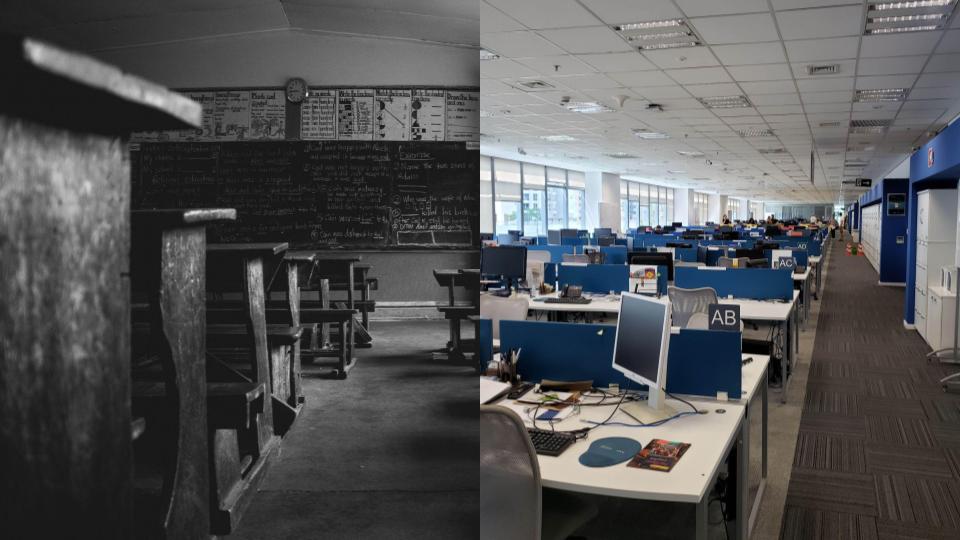
    Ever since I began to work in Learning Technology nearly twenty years ago, the narrative of using technology for learning, teaching and assessment has been that this is something new, a departure from the old-fashioned classrooms kitted out with wooden benches and blackboards and chalk.

    The overriding narrative has focused on the need to re-invent, modernise and otherwise revolutionise education, to make it fit for purpose, future proof and successful. This is one of the driving forces behind much of educational technology. Education in its traditional, old-fashioned model is broken, so the story goes, and EdTech can fix it.

    And yet, what we know from decades of research, practice and policy making in Learning Technology is that no, it isn’t cheaper.

    And yes, you still need teachers (not just machines or event intelligent machines).

    Also, students and staff at all levels need continual upskilling. And no, you can’t rely solely on vendors to measure what works and what doesn’t. You need expertise to make ethical, equitable decisions that take into account the rights and needs of all involved. And no, there isn’t an AI that can do that for you. There are always risks and things go wrong frequently. Using technology for learning, teaching and assessment isn’t a nice to have anymore, it isn’t new anymore and we need to reframe the narrative of a broken education system that technology can fix, to one in which lifelong blended learning is the norm.

    This may sound like an obvious point, but in my experience it really isn’t. Instead, in the past twenty years we have continued to focus on fixing education with technology. And now, technology is offering solutions to ‘fix’ the workplace. This is where lessons from Learning Technology can really teach us a lot about what’s ahead and what we can skip in order to jump right to a better new narrative.

    The tools we use to work from home are very similar if not the same as those we use in education and the same problems and questions arise in both contexts: a lack of trust, collaboration and communication.

    This is what the book I am working on is all about. Sharing lessons so you don’t have to discover them for yourself. In practice, I find that all the lessons we have learnt about EdTech can be translated into working as a virtual team. You need to focus on skills and support instead of savings. You need to find ways to build trust and manage crisis.

    Developing your approach to leading a virtual team or organisation

    Having led my team from being office based to working from home with in person elements to working entirely from home for 12+ months with no in person contact, I’ve had a lot of experience with the different options. And there is much to consider when designing your approach in a post-pandemic workplace.

    After months of working remotely, we have all learned that most tasks are accomplished and most meetings go just fine without the office.

    But that, the authors warn, doesn’t mean companies should suddenly abandon their workplaces. Going to the office, they argue, has never been just about work. And technology won’t make socializing less dependent on direct interpersonal contact anytime soon. In this article they describe the important social functions of an office: It’s where people build trust through personal interaction, learn the nuances of their job, and build and maintain organizational culture. And it’s through random in-person encounters between people from different functions and cultures that many of the most innovative business ideas are born. The authors conclude by showing how design, technology, and management practices can be used to make tomorrow’s offices more effective as social, learning, and innovation spaces.

    https://hbr.org/2021/03/designing-the-hybrid-office

    One function of in person contact is that of social interaction (outside of formal meetings) to foster relationships, social bonds and cooperation – the ‘office as a social anchor’. In person interaction, it argues, helps built commitment and support for each other and the organisation. One of the examples cited is the ‘The WELL (Whole Earth ’Lectronic Link), which started in 1985, is one of the oldest virtual communities in existence’. 35 years later, we have A LOT MORE technology and connectivity to help us establish and grow our virtual teams and communities – but what many of the teams and organisations who only moved online in 2020 don’t have, are the shared experiences of meeting up, sharing life events, supporting each other longer term.

    Even in my team, having worked mostly remotely for 3-4 years now, sharing those events over time, has had a big impact already. It takes times for enough birthdays, weddings, births and so forth to happen in order to share them and for that shared experience to strengthen team and organisational culture and belonging.

    In my experience the onboarding or induction process, is one of the biggest challenges of leading a virtual team.

    Classically, this on-the-job learning takes place through apprenticeship. New employees learn the correct and proper way to behave—“how things are done around here”—from directly observing those around them, especially their mentors.

    Technology can certainly be used to facilitate this sort of learning, but without question an office makes the process a lot easier.

    Here are examples of approaches to help provide as many opportunities as possible for the kind of learning that’s described in the article.

    • As a team, spend time working synchronously with a new member of staff, enabling them to observe how you use tools and systems and explore what you do day to day;
    • Provide a comprehensive induction checklist, with links to processes and procedures, which you work through together;
    • Start the induction process before the first day, to ensure that a new colleague knows what to expect and how to prepare, including undertaking a home-working risk assessment;
    • Provide an induction focusing on the ‘why’ and bigger picture context of what the organisation does, rather than the ‘how’.

    As well as onboarding new members of staff, creating informal opportunities for interaction is a big challenge. It can take a significant amount of time, effort and imagination to create time for ‘unstructured collaboration’ to happen, and initially I spent a lot of my management time experimenting with different approaches to make this happen in my team, including setting up a ‘watercooler chat’, having unstructured ‘show & tell’ elements in weekly team meetings and so forth.

    Since then I’ve come to the conclusion that all of these efforts contribute something, but by far the most effective is to lead by example. Even as a senior leader, you have to make the effort to have open conversations, exploring ideas and questions, sharing thinking in progress, so that you create not only space but also time for the kind of unstructured collaboration you want to happen.

    It’s an important skill for senior leaders in particular to cultivate. The result is less presentation and more collaboration – fewer meetings where no one speaks up and everyone has their cameras turned off and more days on which everyone contributes and ideas spark.

    You can learn to cultivate that kind of approach to leading virtual teams, and it takes a high level of focus on your own skills in communicating and collaborating online. You need to put yourself intentionally in a position in which you would naturally be in an office – sitting at your desk with work in progress, staring out of the window whilst thinking about a difficult problem.

    Head to the project page to find out more or subscribe to news about the book.

  • Virtual Teams: When things get personal

    Hello and welcome to this month’s post on leading a virtual team. In this post (cross-posted here) the two of us, that is Martin Hawksey (@mhawksey) and Maren Deepwell (@marendeepwell), continue our series of openly sharing our approach to leadership.

    If you are new here, you can catch up on earlier posts and podcasts or find out more about ALT, the organisation we work for as senior staff. We really appreciate comments & feedback and welcome questions or suggestions for future posts.

    January

    Maren: Hi. I wanted to start this post by talking about a small professional development experiment we did this month. I came across some online courses run by Google and as we use Google Apps for Education this seemed like a nice way for all of us to do some free CPD, use a familiar platform for a new purpose and have a bit of fun as a team. Everyone was free to choose their own topic, and the plan was to report back at a team meeting and share three things: something you learnt, something you found challenging and something you would like to find out more about. I chose to spend my hour learning more about digital wellbeing (maybe not a new topic, but definitely time well spent) and one of the ideas that I took away from the course is to have ‘device-free’ meetings to encourage individuals to be more present and engage with each other. On the one hand not being distracted by notifications etc makes complete sense to me. Giving others your full attention is important. I wonder what else makes for good online meeting etiquette other than not checking notifications? On the other hand I am not sure that staring at each other’s video feed is always the best way to get people thinking or talking. That reminded me of this visual thought ‘Meeting around a document’ and how sometimes having a walk, an actual one or a virtual wander through a spreadsheet, might be a better way to connect, work, talk together. Thoughts?

    Martin: I also did the digital wellbeing course, mainly because knowing you had already done it we’d have something to discuss. Bryan’s visual thinkery is very apt particularly for distributed teams where we rely on real-time collaborative documents. The thought of working on a MS Word or Excel document and emailing it around as an attachment now seems completely foreign to me. There have been some projects where this has been required because of the limitations Google Docs has when embedding complicated graphs. When I have to go back to this technique now it just seems like such an unproductive way of doing things and I see lots of benefits from ‘meeting around a document’, particularly when combined with video conferencing. It does come with some challenges, for example, making sure everyone is on the same page or spreadsheet tab. As a result I think it requires a little more awareness than if you were working on a document face-to-face. There are also small things that can easily be forgotten. For example we have two colleagues with the same name and there was a moment recently when we all had to be reminded that when meeting virtually, unlike a physical meeting, you can’t easily make eye contact and direct your comment to someone as a result we need to remember to let people know which person you are talking to. You could ask if there is any point in enabling cameras during virtual meetings as often when you are collaborating on a document you might be viewing it in the same window as the meeting but it gets lost underneath. Personally I find even in these situations having video is important, particularly when there are more than two of you. It gives me reassurance that the other person is ‘there’ and not been dropped from the call. Do you have any tips on maintaining focus while in video calls?

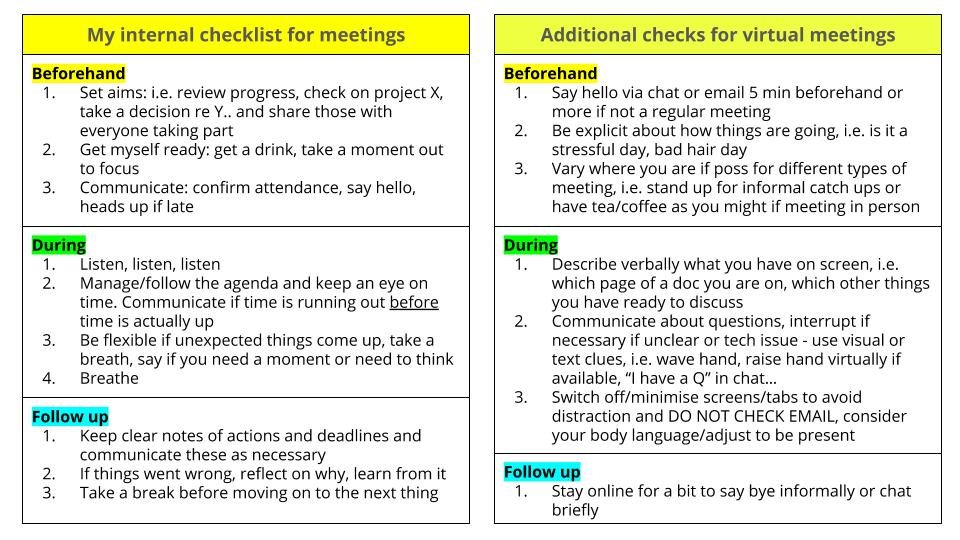
    Maren: I have a mental checklist for meetings that I use for meetings regardless of how they happen. I’ve added a few examples of techniques specifically relevant for online meetings.

    When I lose focus in a call, most of the time that’s because my priorities are wrong: instead of what’s important, I’ll focus on what’s urgent or worse, I get distracted by what’s loudest. That could be emails pinging into my inbox or notifications coming into my phone. Or it could be something more personal like having a bad hair day or feeling self conscious about my new glasses (no one actually noticed). Outside of meetings there is a bigger issue around focus I’d like to think about: in roles like ours, as senior staff, we should ideally focus on what’s important, manage what’s urgent and oversee what’s loud or noisy (noisy, but part of the day to day churn of running the organisation). In practice as the pressure we are under goes up, the higher the workload for whatever reason, the less good I become at delegating and the more prone to get stuck in and simply ‘do’. Working in a distributed team some of the physical prompts to prioritise are absent: for example, in a traditional setting you may have team meetings in one room but meet the Board or plan strategy in another. In our virtual working environment all meeting rooms are equal – it’s up to us to create a different atmosphere, a different focus. Similarly, when my former boss was in the office and working on something he would close the door to indicate that he was not to be disturbed unless it was urgent. Now, it’s up to me to shut down my inbox, tell everyone I am busy via chat or update my calendar and make that space to focus and have no distractions. It’s a bit like training for a race, preparation & practice are key. And a sense of fun/a bit of humour goes a long way to get you through rough patches.

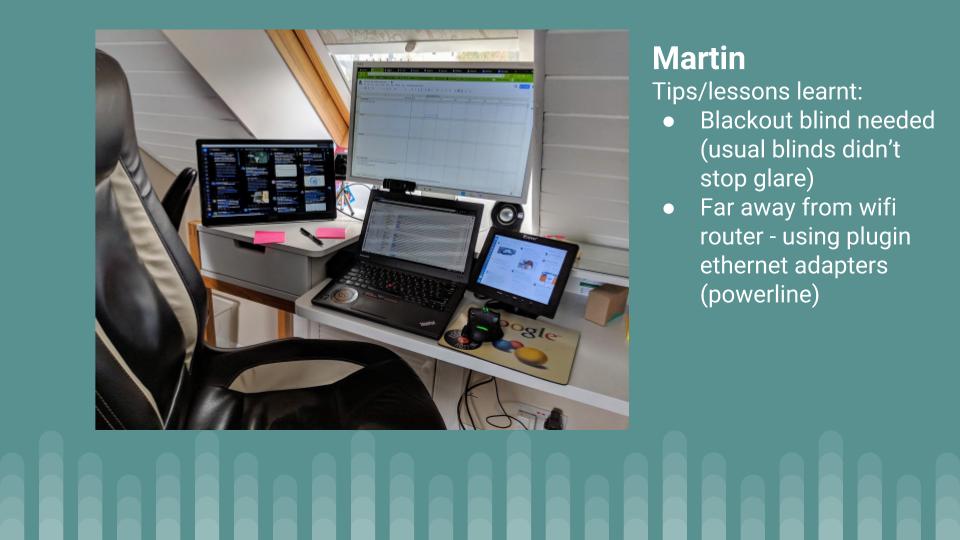
    Martin: Great checklists! I was recently invited to a meeting. The person co-ordinating the meetings was conducting interviews and used Google Calendar appointment slots to allow me select a time that suited me best. As part of the sign-up the calendar slots included some tips on meetings like the prompt “what is the desirable outcome of this meeting?” and a link to Wikihow: Prepare for a meeting. I didn’t think that the Wikihow guidance is that great but liked the idea of using appointment slots and those slots being prefilled with some guidance text with the option for the person taking the slot to edit the text. In terms of ‘noise’ I’ve followed Alan Livine’s advice and will now often put the radio on in the morning. Generally meetings later in the day mean I end up turning it off and forgetting to put it back on. To also reduce the noise of notifications I generally always have Windows 10 Focus Assist on which reduces the number of pings and alerts you get. As part of our year end we are also conducting a “home working setup – annual check-in” where we are encouraging our team to share a photo of their setup and include a couple of tips/lessons learned. As I look after ALT infrastructure and oversee our social media I never like to be too far away from being contactable – if our website goes down I want to know about it. As a result my home setup has a lot of screen real estate to help, the downside is there are a lot of potential distractions:

    Something else that features in this pic are post-it notes. I’ve got various online note tools, mainly Google Keep, but still find particularly when our workload increases that the processes of prioritising what I need to achieve by writing it down very useful … it’s also always nice to cross something off when complete. One downside of physical notes relates to your comment about closing office doors when you are busy. There is no easy way for the rest of the team to see what is on my notes. What I really need is a view access only option on Google Keep…

    Maren: I hadn’t tried out the calendar slot scheduling, so that’s a new tip for me. And I definitely agree we should support a feature request for view only Keep notes! With such frequent iteration on the platform, I don’t always spot new things or indeed explore the potential of innovations as they appear. A recent week of A/B testing left me rather puzzled as my interfaces suddenly looked different to everyone else’s. I suppose it’s the flipside of being “agile”… and as the in house family tech support that many of us who work in Learning Technology are, I frequently try and explain to elderly users, i.e. my mom, why indeed she has to adapt to the way things are done afresh every few months. It plays havoc with our family tech manuals (my mom was an accountant, we have manuals…) and is REALLY unhelpful for people who have trouble with technology to begin with. I am not going to mention here the problems even blogging brings with it just now thanks to the recent WordPress innovations… there’s plenty of that discussion already going on. My closing thought for this month’s conversation is really about how personal all of this is, how much of a personal issue managing our relationship with technology and our wellbeing (online and physical) is. Sure, it’s an obvious point to make, but I wonder how me having appointment slots in my calendar may feel to someone who is used to having a chat about when to meet? I often underestimate how small actions like this may come across at a human level. I feel a whole new blog post coming on, so I better pause here… any final thoughts from you?

    Martin: I completely agree that our individual relationship with technology varies as does the level of confidence we individually have when faced with change. Someone you chat with to arrange a meeting might prefer picking a calendar slot. This really underlines your point that this is all very personal, one thing that works for one person might not for the next … let’s just be grateful we are a team of 6, not 60, 600 or even more than that.  

    More to read and listen to:

    Getting Virtual Teams Right (Harvard Business Review)

  • One year without an office…

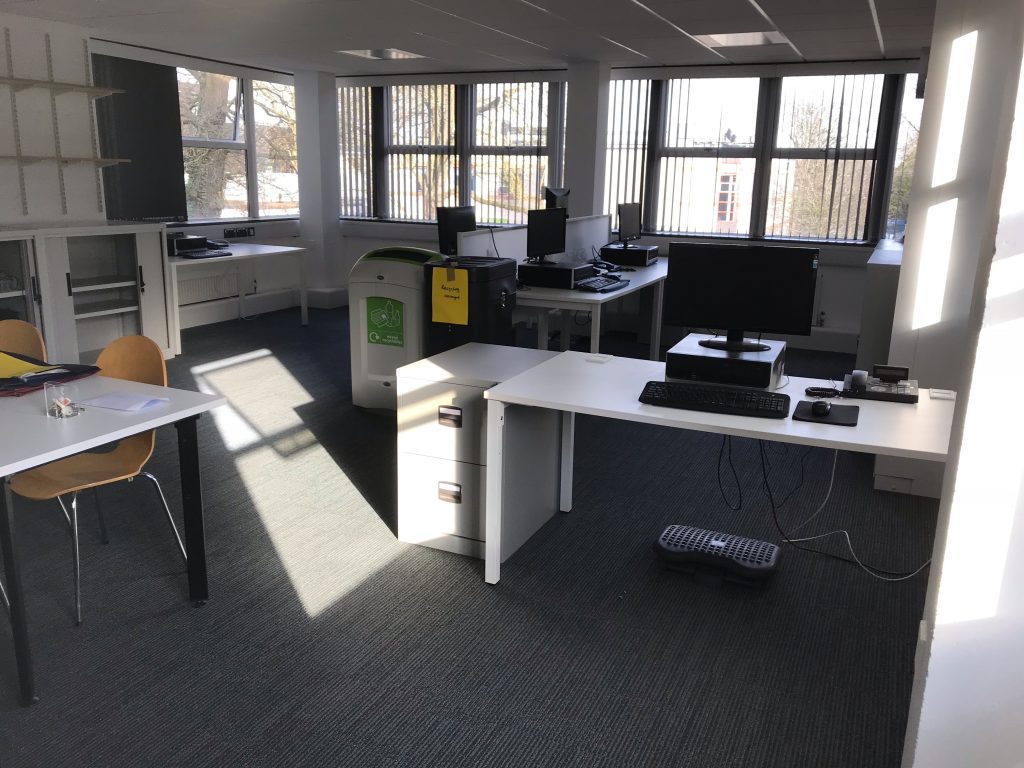
    A photo of the office with furniture but otherwise empty
    The office…

    A year ago this week I locked the door to this office for the last time, handed back the keys to the estate manager (never seen such a tidy move, he said) and left the building – leading my team, my organisation into the brave new world of being a distributed organisation, a virtual team.

    You can read all about what happened next… the official updates for Members written by Trustees and myself, in formal reports and audited accounts and the less formal account published in a joint series of posts with Martin Hawksey, which includes even podcasts. All together these will give you insight into how resources were saved and reinvested more effectively, strategic aims achieved with more impact, lessons learnt, home working cultures established and so forth. I am proud of that record one year after closing the office and whilst this is of course an ongoing progress of transition, there is clear evidence that all the aims we set out for the transition when we originally started planning 2 years ago have been achieved and even exceeded. It’s been a team effort.

    So what’s it like to be a CEO without an office?
    What’s it like to represent a long established professional body without a physical base?
    How does it feel to be a Line Manager, everyone’s boss, remotely?

    Well, let’s start with the last one: currently I manage 6 people and 4 of the 6 were recruited as virtual team home workers, to be part of a distributed organisation. I spend the same amount of time on all the things you do to manage, support, motivate and be there for others – just the way in which we connect and the locations where we see each other are now more varied. In turn, everyone, including myself, spends just as much time and effort being part of a team – again, just in different colourways and with different challenges. Instead of dirty cups that no one has washed up or bins that overflow, we focus on the logistics of office supplies or connectivity. Instead of having light bulb moments sitting around a meeting table, we have inspiring ideas meeting around a document. It works, we deliver and perform.

    As the leading professional body for Learning Technologists the Members we serve as an organisation are probably more likely to appreciate the potential of technology when it comes to running an organisation. Many people involved in ALT have experience of being part of a virtual team, collaborating with others who are not based where they are and they appreciate the power of a distributed network. So when we moved from having most staff based in one location to having staff based all around the UK, there was nothing but welcome for the opportunities that opened up. Members have hosted us for the day when we all come together or have a visit, kindly providing us with a base for the day. More support for volunteer-led activities all around the country makes us a stronger community and provides greater contact with Trustees as well. If for those already involved in the organisation it hasn’t been an issue, there have been plenty of partners and other organisations who have taken some convincing. I often meet with the question of where am I based, and when I explain that we don’t have a physical HQ anymore, they aren’t really clear how that can work?! Or indeed how professional or serious we can be if the address on our business cards is now to the website. We do of course have a registered address, and a postal one for correspondence, too – but the small amount of physical post that arrives at either (and indeed our old address one year on) is rarely more thank junk mail. Although we really do appreciate the holiday greetings 🙂 That said, as we continue to work together even for those who were initially sceptical the issue of where we are based fades into the background. We deliver what we promise, we are responsive, we work hard to help where we can and all of that builds trust better than bricks and mortar.

    But the question most personal to me is probably what’s it like to be a CEO without an office. To some people, it’s a akin to what it would have been like to be upper class without an estate. The office, the estate, the shiny things within bright white rooms or dark grey rooms or brightly coloured rooms with free food and pool tables… the assistants, the clothes, the coffee, the meeting rooms, the tech, the desk, the chair – the drama of welcoming guests to your office! What kind of CEO can I be without all of that? Most of the CEOs I meet are seriously wondering (and in many cases they already have to contend with my gender, age, nationality to overcome their preconceptions). Of course, there are plenty of other CEOs and leaders who are working, and have been working for decades, without an office, based remotely or travelling a lot. That’s not a new thing in itself. But sadly in many cases those in power fit the traditional template here in the UK and so their casual insistence to visit our offices, meet over coffee etc often turns to puzzlement when there is no physical space for them to pinpoint that represents the organisation I lead. For me, it’s helpful. It can be very insightful to see how people react to the “no office… virtual organisation” answer to their question about where I am based. It helps me chose how I approach them better. For some, it endows me with tech credentials (she needs to know something about tech if she runs the organisation from home…), for others, it conveys a sense that I have a flexibility approach to work, maybe understand more about work/life/family balancing acts. It can also signal that I care about putting resources where they make the most impact for the charity, rather than having a plush office. A year in, what I know for certain is that without an office I can very much be the CEO I want to be, maybe more so than before. I love the freedom not having to manage physical space has opened up and the bigger perspective it has given me.

    So this Wednesday, when the first anniversary comes around, I shall be raising a glass to mark the occasion. Not to celebrate exactly, but to remind myself of something a colleague said to me the day we handed the keys back. It’s quite remarkable what you can achieve when you put your mind to it. Cheers.

  • Virtual teams: a special podcast edition

    Cover image: Special Podcast Edition: Reflecting on the first year leading a virtual team

    This post continues the series on openly sharing our approach to leading a virtual team – a joint project with Martin Hawksey (cross-posted here) for which we write a monthly blog post and this time recorded a podcast for you, too.

    What a year…

    With the transition to becoming a distributed organisation and one year of leading our virtual team under our belt, we reflect on the highs and lows, the good and the bad and most importantly on what’s ahead as we continue to develop this project in open practice.

    Maren: There’s so much I’d like to talk about that it’s hard to know where to start. First, I’m excited about how a transition plan on a spreadsheet has turned into reality, how the organisation we lead has changed over the past 18 months. Second, there’re 101 things I’ve learnt along the way, from how to set up a PO Box when you are a distributed organisation (harder than you think) to how to manage a virtual team and all that that entails. And then there are all the things I’ve discovered about being a home worker… during summer holidays, family emergencies and when things go wrong. It’s never been boring, that’s for sure!

    How about how? What’s been most surprising and rewarding this past year? What are you most keen to develop next? This time next year… will we be millionaires?

    Martin: Time has really flown by, it only seemed like yesterday that we started putting in place some of the operational changes for moving to a distributed organisation. It’s only the fact that I’ve started to receive renewal notifications for annual licences for things we didn’t require before in a host institution that I’m reminded of the realities of the changes we had to put in place. In some ways I have to say that the most rewarding thing in the past year has been the shared monthly posts we are doing. When we started I thought it would be useful to share with others the journey we as an organisation were on. I’ll let others decided whether it has been useful or not, but regardless I’ve personally greatly benefited from the opportunity to reflect on progress and consider where we go next. Reflecting on December something that stood out for me was in September’s post on the ‘serious upsides of working in pyjamas’, we discussed remote worker wellbeing. In December as the cold has set in it’s been noticeable how we’ve swapped pyjamas for thick jumpers and blankets. As a remote worker you’ve the benefit of having more control over your working environment. The downside I find, particularly if you are a skinflint like me, is you are reluctant to put the heating on if you are the only one in the property. As an employer our organisation is limited in what we can do. We all get a home working allowance but that is limited and it is up to us individually to decide how it is used. Seasonal variations in remote teams wasn’t something I had anticipated. Do you have any standout unanticipated moments?    

    Maren: It often feels to me like this whole year has been one long unanticipated moment. There’s definitely a lot we could talk about in that whole area of remote working and wellbeing. Writing these posts has helped us both become more aware of the complex issues involved and it’s interesting just how much there is to unpack here, both from the perspective of a small employer and ourselves as individuals.
    Another question you touch upon is whom this kind of open leadership practice is for. Our readers include our own team, the Board of Trustees whom we report to, Members of ALT and our professional networks. On Twitter, LinkedIn and our own blogs as well as at events we’ve been getting comments, questions & feedback – and many of them are about open practice rather than the virtual org transition. Senior staff don’t often adopt the approach we are taking, to discuss the inner workings of their organisation as they happen. Bringing our Learning Technology open practice into how we lead the team and managed the transition feels like an important step forward. It’s prompted me to think differently about innovating, about improving things even if they are new/in progress. No one gets to start new things on a blank slate or with everything in steady state very often. There’s usually legacy issues, deadlines, risks etc from the outset. By making time to focus on how we run the organisation we’ve been able to innovate much more in that area and that’s been exciting.

    Martin: You touched upon space in terms of time and locations such as various social networks. Something I’ve been thinking about more is mental space. This is an area we’ve talked about a couple of times, but a recent experience reminded me how important I find it to compartmentalize my workspace and personal space as part of being a remote worker and also how difficult it can be sometimes for others to understand this. Recently my parents were staying with us for the holidays. At home my ‘office’ is also the spare bedroom. Having a dedicated space for me to work is very important, not least it means I can just go to work each morning and not have to set up anything, I just switch on and go. This year my parents wanted to stay a little longer which meant they’d still need the spare room while I went back to work. As part of this they said they would make sure they would be out of the spare room/my office by 9am each day. Initially I didn’t say anything but in the end had to say to them it wasn’t going to work for me. The issue I had in my own mind is going to the office as a remote worker is more than just being at your desk at 9am. With suitcases and clothes lying around I was worried it was going to feel less like an office. Knowing my parents were in the house I was worried it was going to feel less like being at work. I appreciate for many these things sound trivial, but for me they are very important. If I worked in a traditional office in my own mind I knew it was going to feel like having my parents sitting in reception all day. I think this aspect of remote working can be hard for others to appreciate. Have you had any similar experiences?

    Maren: I’ve not worked from home for as long as you have and regular travel is a big part of my role, so I come to this from a different angle: I have created a mental work space that I can function in properly on a train, hotel room or at an event. I feel comfortable in that space. And it’s probably why I have a strong attachment to my chromebook, stickers and all. That said, creating that space in my head at my home has been tricky! Trickier than I had anticipated especially given how rarely I was desk based before working from home. And like you I prefer having physical space that’s ‘mine’ for that – but limited space, my cat, family etc really challenge that at times. I hated strongly disliked working in an office and I feel working from home is a hard won privilege. I love working from home and it suits me really well. Still, I have had to rearrange my set up at least 5 times in the first year, moving furniture, changing equipment, adjusting to how the sun comes in through the window and so forth. I have ended up with a yoga bolster as a footrest and using the windowsill as a temporary standing desk. I’m also a carer for my parents so my work/family lines are already blurry, but working from home has made that more… prominent in my mind. I may have also come to the conclusion that I would ideally need a bigger house! My work space is adjacent to the family bathroom and the main space to dry laundry as well as the notional spare room. Like you, I have to try and articulate my workspace not only in my own mind but to family, friends, guests & my cat. It reminds me of a Seinfeld episode in which George is talking to Jerry about his new girlfriend making friends with his other friends, how those two parts of his life are starting to mesh and he feels panic because he fears losing space to be ‘Independent George’ and end up being ‘Relationship George’ all of the time he shouts: ‘worlds are colliding, Jerry!’ I feel similarly about working from home – sometimes it seems like worlds are colliding.